Skip to content
Shirish Kadam
Go back

How to add your Wordpress website to Dreamweaver CS6?

Edit page
How to add your Wordpress website to Dreamweaver CS6?
adobe.com/ adobe.com

      Adobe Dreamweaver CS6 is a HTML editor, web development, and designing software by Adobe system released in 21st April 2012. It is the best web editing software in the market and is easy to use. In this tutorial, I will help you to connect your Wordpress (Content Management System) website to Dreamweaver CS6 so that you can edit your website’s wordpress themes as per your needs. The screenshots will make your work easier, below are the things you will need.

Requirements:-

·       A domain name with hosting.

·       Wordpress 3.0 or above installed on it.(Wordpress 3.5.1)

·       Adobe Dreamweaver CS6 or CS5.

If you have all the above things on your system then you are good to go. Let us get started with our tutorial. This tutorial will be divided in two sections for the convenience of understanding.

·       Adding your website to Dreamweaver CS6:-****

1.     Open Dreamweaver CS6 and go to Site tab and select New site and there you will see New site setup.

2.     Now enter the Site Name as you wish and Locate a folder where you want to store all the data.

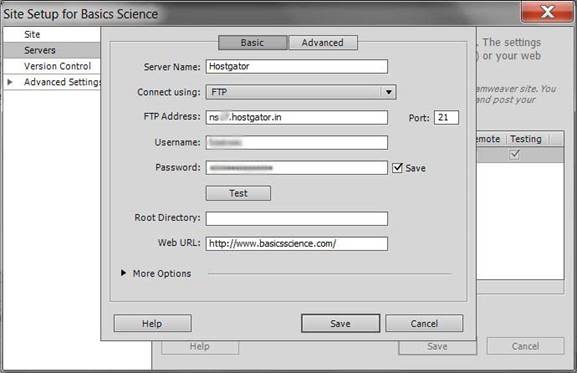
3.     Select Servers tab and click the + button at the bottom and the Server setup window opens.

4.     Type a server name as you wish, it can be anything. Then Connect using > FTP and for FTP address you should enter the server address that your hosting provider has given you (Check your email inbox) and type it there without any errors.

5.     Now as you have Hosting service at your website, you must have a unique Username and Password that you have to enter it in those fields. Then click the Test button to verify your details.

6.     Leave the Root Directory option blank and proceed to Web URL. Here enter your Web URL (Your domain name).

7.     Go at the top again, switch from Basic mode to Advance, and select the Server Model as PHP MySQL. Rest options are not to be changed.

8.     Save your details. There is no need to change other options click Save and the Setup will close. Dreamweaver will import the necessary data and server details, and in minutes, you will see those files at the right side bottom of the window. Great, you have successfully added your website to Dreamweaver CS6.

 image

Note: If you cannot verify your login details expand the More Options check Use Proxy, Use Passive FTP, Use IPV6 or try disabling you firewall as it may be interrupting the connections. If the problem persists let me know at the comments box I will be happy to help you.

·       How to connect the website to your wordpress account:-

1.     Select the Site tab again, scroll down, and select Site-Specific Code Hints. The setup will open, select Structure as Wordpress and click Ok.(Make sure the File is selected as Sub-Root)

              image

2.     At the Remote Server (Right hand side bottom of the window), select index.php file. Then the code will appear but you will see a notification at the top which reads as ‘This page may have dynamically-related files that can only be discovered by the serve.’ Select Discover and still you may see another notification but it is because we do not have our website in the directory, we have it on the hosting server, so select the Live button, which is above the notification. Thus you see your website live.

3.     Now a window pops up ‘Update on Testing Server’ click Yes again another window pops up ‘Dependent files’ click Yes.

4.     Select the split view so that you can see your website and its code at the same time. If you see error page then try inserting your homepage address in the address bar. Congratulations, you have added your wordpress website to your Dreamweaver CS6. You can edit your HTML or CSS codes to customize your wordpress theme.

basicsscience.com/ basicsscience.com

      If you have any problems regarding the setup, comment below and I will try my best to help you to solve them. The website used in this tutorial is Basics Science.

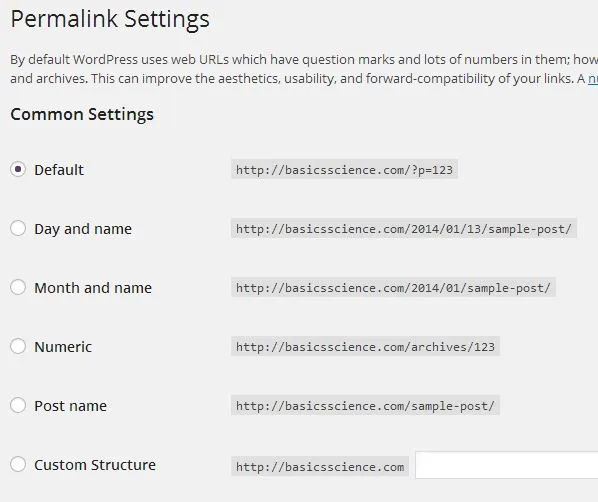
    From the comments below I think some of our friends are having problem with setting up the website. You must be receiving this error message “Dynamically-related files could not be resolved because the site definition is not correct for this server.”

    There is some issue with websites that are set up with wordpress. The Dreamweaver shows the above error if your Premalink settings are customized to avoid it change it to Default. Please follow the screen shot.
image

- [#See# : Adobe Dreamweaver CS6](http://ashamed4ku9l.wordpress.com/2013/03/07/see-adobe-dreamweaver-cs6/) (ashamed4ku9l.wordpress.com)

Edit page
Share this post on:

Comments

Older comments (67)
M
Mathilda Malphurs
Good info. Lucky me I discovered your blog by accident (stumbleupon). I've book-marked it for later!
S
Shirish Kadam
Cheers :D
M
Mike
DW still the best code editor! I use it for modding WordPress, Drupal and Joomla on my dev server. Great search tools for finding those bits of theme and plugin code needing modification/fixing too
S
Shirish Kadam
Actually I discovered it quite late but loved it quickly...lots of features to customize your blog and not necessary that you must know everything of coding...basics is sufficient.
M
Mike
Dreamweaver was my introduction to web design way back when. Agree with you - it's not difficult to use, and one can learn a great deal about HTML/CSS just by building small HTML sites - even add-on sections to a site using a CMS like WordPress. Only disadvantage in my opinion - it's a bit pricey for the casual user.
S
Shirish Kadam
Yes it is expensive...Adobe software are really expensive but you can always try for Students Teachers plan, that is a bit affordable. Being expensive these softwares do not reach the common people's hands or the masses...
P
PooMik
Love Dreamweaver, and your instructions are good, but how do i set up a testing server, or dont i need one??
S
sohila zadran
Hi, i read your blog from time to time and i own a similar one and i was just wondering if you get a lot of spam feedback? If so how do you reduce it, any plugin or anything you can recommend? I get so much lately it's driving me insane so any help is very much appreciated.
S
Shirish Kadam
There is plugin called 'Akismet' which will help you to block the spam comments...Also read my post on how to deal with spam comments http://shirishkadam.wordpress.com/2013/04/30/how-to-deal-with-spam-comments/
D
Daniel G.
Thank you very much, Shirish! When I get this working, it will be so much easier than the way I used to do it (using Dreamweaver CS4-CS5 and MAMP to create a local server on my computer). I really appreciate this tutorial. I have a problem setting up my Site / Server info, though. Maybe you can help me. I set up WordPress in its own folder within my website (http://mydomain.com/wordpress) and then copied the index.php file to the root directory (so that I can use http://mydomain as the URL but it gets the content from the WordPress folder). How would this change my settings in the Site / Server window? Thanks in advance for any suggestions.
S
Shirish Kadam
Hey, Daniel thanks for your feedback...! About your problem I am sorry to tell you that I have no solution for it, except you can try contacting the Wordpress support team. They can only help with it also I recommend you to try Wordpress Support Forum. Good Luck!
S
So here is my question. Do I have to have something special from wordpress to make this happen? I own my domain name yet it is hosted by wordpress where right now I create my pages and content from wordpress directly. I want more freedom without having to pay wordpress for all the fancy designer options when I own dreamweaver. When DW asks me for server name, is this basically just wordpress? I am not sure that I am doing this correctly or if I need to have a more advanced hosting than the *free* hosting that my current blog has now. I hope this makes sense because I have no idea how to say what I need. LOL
S
Shirish Kadam
Ok...You have bought a Domain name from Wordpress and want to edit your own codes...But let me make it clear when you buy domain names from Wordpress you only buy the names and not the control over the codes of your website. So, If you want to edit your own website you need to buy one of their plans...there is no other *free* way you can do it, the Wordpress team has made it pretty sure... Hope this helps. Good Day!
L
Loungin Out
hey man love the tutorial so far yours was the closest i got to working. I set up everything right and did other variation of the how to set it sync the wp themes methods but still cant get the dynamic files. It looks like i have everything set up right even defaulted the permalinks on wordpress and yet still no good, think you can help me out ?
S
Shirish Kadam
Thanks for your feedback...! Dreamweaver CS6 has a bug, to display the dynamic files you need to leave the Wordpress premalinks setting to its default.A permalink is what another weblogger will use to link to your article (or section), or how you might send a link to your story in an e-mail message. The URL to each post should be permanent, and never change — hence permalink.To know more about them follow this link Source: Wordpress.org If you have changed your premalink settings according to your customization then change it to default. For more help please follow this link of Adobe Community
M
meganmariebrown
i think i am having the same problem as the guy above me. im pretty sure i have everything set up correctly but im getting the yellow bar at the top saying 'dynamically-related files could not be resolved because the site definition is not correct for this server' any ideas?
S
Shirish Kadam
I have addressed the issue in the comment above also I am uploading a screenshot of changing the Wordpress Premalinks to the default setting. Hope this helps...Good day.
L
lizilizi
hi thanks so much!\ i have a problem after i did everything you wrote here and checked my self 1000 times i still dont get my site on the design side i get like my site is not exist why? please help!:( lizi
S
Shirish Kadam
I am actually not sure what your problem is, may be you can upload the screenshot or you can tell me the error message. If you have problem with Dynamic files check the comments above.
W
weikhai.ang
Hi, Thanks so much for the info! however i got stuck at the part where i am supposed to select the index.php file at the remote server. I cannot locate the file. Do you have any idea why ? Your help would be much appreciated! thanks!!
S
Shirish Kadam
Try the "find" tool...its there!
R
russ
I get an error that says Dynamically-related files cannot be discovered because a testing server is not defined. However, every time I try to define a testing server locally, I run into a myriad of other problems. Do you have a tutorial or tips on how to define a testing server for this project?
S
Shirish Kadam
I am sticking the link to Adobe Help for setting up testing server...Please click here.
S
Thank you! Just applied these steps to Dreamweaver CC and it worked like a charm. Cheers.
D
Damien
Hi, thanks for the article. After follow all the instruction I pretty much get all the database in WP linked to my dreamweaver. However, when I load the index.php file onto the split view and Live view, the page only show all the php files on the site but did not actually pull out the content or execute the php files in the index.php to generate my home page. How could I get them onto my dreamweaver and edit them? thanks
S
Shirish Kadam
How to edit existing remote website (Adobe Help) I hope this is what you are asking about...good luck
Y
YO HO
i have the error ”Dynamically-related files could not be resolved because the site definition is not correct for this server.” and i don't understand what you mean with There is some issue with websites that are set up with wordpress. The Dreamweaver shows the above error if your Premalink settings are customized to avoid it change it to Default. Please follow the screen shot. fallow what screen shot where and what i need to change to default i am in cs6 12.0
S
Shirish Kadam
I have addressed the issue and updated its screenshot... Remember to set those Permalinks settings to "Default".
E
[…] Thank you Shirish Kadam, Read the Article […]
2
[…] Add your WordPress Website into Dreamweaver […]
Y
Yuvi Sharma
If you are using Wordpress.com they do not allow FTP access. You would need to buy your own webspace, download WordPress, install it on your server, and then you can configure FTP access and use Dreamweaver in a more integrated setup.
S
Shirish Kadam
Yes absolutely...Dreamweaver does not support Wordpress.com blogs.
2
[…] Add your WordPress Website into Dreamweaver […]
J
Jay Vadgama
Excellent! Just what I was looking for. Learning about website setup and wordpress.
2
[…] Add your WordPress Website into Dreamweaver […]
C
Claire
Hello Shirish, I find your page really usefull, I'm trying to follow your directions but I'm stuck on: · How to connect the website to your wordpress account:- At the Remote Server (Right hand side bottom of the window), select index.php file. Then the code will appear but you will see a notification at the top which reads as ‘This page may have dynamically-related files that can only be discovered by the serve.’ Select Discover and still you may see another notification but it is because we do not have our website in the directory, we have it on the hosting server, so select the Live button, which is above the notification. Thus you see your website live. I trully do not understand what you mean with "at the remote server" and select index.php file. I must be doing something wrong... As i'm french I need to translate everything in my head first to try to understand it. Maybe, explaining it in a different way would do the trick? thanks in advance! claire
S
Shirish Kadam
Remote Server is actually the system on which your server provider store all the information about your website...check your hosting account or ask your hosting service provider for access to remote server.Check out this video for more help. Thank You. :)
R
ravi
thanks sir for help me........
A
araceliconcordia
Hi Shirish, I'm trying to connect my WP account but having trouble at step #2. When I click the Site Tab then choose Site Specific-Code Hint. Then #2 says, "2. At the Remote Server (Right hand side bottom of the window), select index.php file. " I can't find "index.php" in the window. What am I doing wrong. Thank you!
S
Shirish Kadam
Your default (home page) webpage can be index.html or index.asp or in my case its index.php...You can select the index.php file and click on the Live View button to view your website.
K
Kelle
My developer is trying to convince me to move to .net from PHP. I have always disliked the idea because of the costs. But he's tryiong none the less. I've been using WordPress on a variety of websites for about a year and am nervous about switching to another platform. I have heard fantastic things about blogengine.net. Is there a way I can transfer all my wordpress content into it? Any kind of help would be greatly appreciated!
S
Shirish Kadam
I have never tried other platform or CMS but I think I will still prefer Wordpress over others because of its User-friendly Interface. When you will move to other CMS then you will realize that lots things you will have to do on your own and well it takes a lot of time to configure them. Also most of the other CMS provides you with lots of option and settings which are rather irrelevant to user or not required...this may confusion...Although you say you have a developer your are good to try it out...
T
tłumacz niemieckiego wrocław
This is a topic which is close to my heart... Thank you! Exactly where are your contact details though?
S
Shirish Kadam
Cool... :)
J
Jonas Lusalusa
Thank you.
R
Ryan Rc
Hi. I cannot find the index.php in the remote server.
S
Shirish Kadam
Please visit your hosting service Cpanel and The file might be existing in your website's folder under the directory 'public_html' or something like that...
E
emomento
Hi, Done adding wp to dreamweaver. (Thanks to u) Just few more (stupid) questions. Sorry im quite noob on html and wordpress. Learning here. 1) The default is in (index).php? Can i change it .html? 2) How do i save the file after coding? Overwrite index.php? Thanks
S
Shirish Kadam
Php is a server side scripting and html is mostly embedded in it ...if so ur extension should be index.php...now still if u wanna change the extension of your index.php you need to change the default settings of ur php installation at the server which might be under the file php.ini . All you need to do is to change the default home page which will be index.php to any other name like home.php *now home.php will be considered as a default home page to load from the server directory....
L
lynneluschLynne
Hi . I followed your instruction and for some reason when i click the index php file which is only 1kb my site doesnt show up just a blank page with the word body in the top left corner. where am i going wrong?? . This is incredibly frustrating.
S
Shirish Kadam
Now I am no sure what code exactly is written in your index.php file...making it look blank.
J
JoeBloGging.com
Lean How to install WordPress on Dreamweaver in less then 3 minutes http://youtu.be/EiPl9kXIDy8
S
Sam
Hi, Every time I try to 'discover' the dynamically-related files, it says it was cancelled. I have set permalinks to default but still no luck? Can you help please? Thanks
B
blocfortyeight
Hi, I tried to sync my Wordpress to my Dreamweaver but am unable to. Apparently it could be my firewall or FTP user limit is up. I've disabled the Firewall. Still nothing. Use Proxy, Use Passive FTP, Use IPV6 (Done). Still nothing. Can you please help? Thanks!
D
dethkultxAmir
Hi, I am currently having this one problem. As a favor to a friend, he asked to make a few webpages for his assignment. Time is running out for me to make it fully using Dreamweaver. So I made them using wordpress. Just in case his lecturer won't accept it, do you know how to convert it to a format acceptable to Dreamweaver? I tried copying the html page source straight to Dreamweaver but it's kinda messed up. Guess it's not as simple as that. Any suggestion?
F
face2mask
Hi Shirish, I have accidentedly choen user.php instead of index.php. and now I have a msg that pop up that said denamically-related file could not be resolved because the site definition is not correct for this server. 404 not found. what shall I do now? thanks.
E
E.Edwards
As a student, you can have access to all of Adobe's CC programs, including Dreamweaver, for $29.99 per month--includes all updates, too. It is not that much more if you are not a student. It's the only way I could have all of the programs from Adobe that I use every day.
B
borispteeph
Thanks for this Shirish, All went well until I got to this step 2. At the Remote Server (Right hand side bottom of the window), select index.php file. Then the code will appear but you will see a notification at the top which reads as ‘This page may have dynamically-related files that can only be discovered by the serve.’ Select Discover and still you may see another notification but it is because we do not have our website in the directory, we have it on the hosting server, so select the Live button, which is above the notification. Thus you see your website live. I just do not know where you are finding this "Remote Server"? and therefore cannot select index.php file. Help
H
[…] How to add your WordPress website to Dreamweaver CS6 … – Adobe Dreamweaver CS6 is a HTML editor, web development, and designing software by Adobe system released in 21 st April 2012. It is the best web editing software in … […]
E
excellanguages
This may be a silly question, but how do you edit the php WordPress pages in Dreamweaver? Everything works fine, testing server running, no server errors, all pages display fine etc. However, all css attributes for each of the page component are greyed out and you can’t add neither a class or id to them (I can add new styles to the “style.css” or modify existing ones though) The only work around that I can think of is to open preview the page in a browser, save it as html, and add the necessary css attributes to the html page which does not seem to be the most practical way to do it. I am either doing something wrong or is just my lack of knowledge on the subject... If you have any suggestions it would be much appreciated. Thanks, V
H
[…] How to add your WordPress website to Dreamweaver CS6 … – Adobe Dreamweaver CS6 is a HTML editor, web development, and designing software by Adobe system released in 21 st April 2012. It is the best web editing software in … […]
H
[…] How to add your WordPress website to Dreamweaver CS6 … – Adobe Dreamweaver CS6 is a HTML editor, web development, and designing software by Adobe system released in 21 st April 2012. It is the best web editing software in … […]
H
[…] How to add your WordPress website to Dreamweaver CS6 … – Adobe Dreamweaver CS6 is a HTML editor, web development, and designing software by Adobe system released in 21 st April 2012. It is the best web editing software in … […]
H
[…] How to add your WordPress website to Dreamweaver CS6 … – Shirish Kadam. I am a 21 yrs old Computer Engineering Student. I am interested in Natural Language Processing and Android Development. […]
B
Bernard El Dib
Hi there, I did everything as you said until the last step and dreamweaver crashed. Everything online talks about installing wordpress and the PHP Wamp.... I wonder what went wrong and if the file needs to be in the Local host folder?
J
judith018
Wow! your explanation worked perfectly for me. I ve been on this issue for weeks now until i stumbled on your post. You rock! Thanks …..
R
Robert
How would you edit/change a wordpress website to dreamweaver that is being locally hosted? I've been using wordpress till I could get dreamweaver and as I used wordpress more and more, it just seemed like it wasn't for me so I got dreamweaver now and would like to take my progress from Wordpress that I was hosting locally with Xamp to dreamweaver but I'm very confused.

Previous Post
Blogging tips for Beginners.
Next Post
Recommended Wordpress Plugins.